Cart
Your shopping cart is empty!
It's never too late to make things right :)



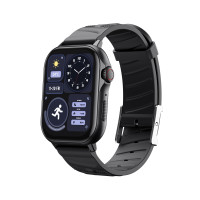
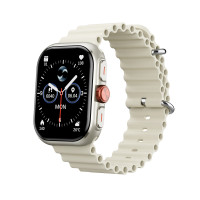


The HAVIT M9058 Professional GPS Sport smartwatch is the ideal choice for athletes and active people. The watch has a 1.43" high-resolution (466x466) screen, which makes the image clear, bright, and rich. It has a 400 mAh battery, which allows it to work for a long time without recharging.
The smartwatch supports GPS, BeiDou, Galileo, GLONASS, Quasi-Zenith, and Satellite-Based, which allows it to determine its exact location while traveling. It can also be used as a compass thanks to its geomagnetic sensor. In addition to 24/7 health monitoring, the watch also has a pressure sensor with an altitude detection function, which can be useful during sports and hiking. Using the device, you can receive calls, adjust the volume, check the weather forecast, and activate an SOS signal. Watch The watch is water resistant to 3 ATM, so you can wear it while washing your hands, in the rain, or swimming. The device supports Bluetooth 5.3, providing a stable connection with your smartphone for data syncing and receiving notifications. Compatible with iOS 13.0 and Android 9.0 and higher, allowing you to use the watch with most modern devices. The app for connecting and setting up the watch is Fitbeing. Warranty – 12 months. Instructions for using the watch
1. To turn on the watch, simply press the watch crown. If the watch does not turn on, it needs to be charged. After 10 minutes of charging, try again.
2. In the Fitbeing app, select "Set up a device". Connect your watch to your smartphone via Bluetooth. Page 3. Turn on the watch by pressing the wheel. Press it again to enter the app menu. 4. Switch between menu screens by turning the wheel. Page 5. Adjust the volume of the sound prompt and the sound during calls by turning the wheel.
6. Briefly press the "Button" on the watch case to enter the workout mode and long press to activate the SOS signal.
7. Swipe down on the screen to enter the Notification center and up to enter the Control center.
8. Switch between watch functions by swiping left or right.
9. To enter the watch gallery, press the screen with your finger for a second. Choose the desired option from the gallery by pressing and holding your finger on it for a second.
There are no reviews for this product.


