Cart
Your shopping cart is empty!
It's never too late to make things right :)



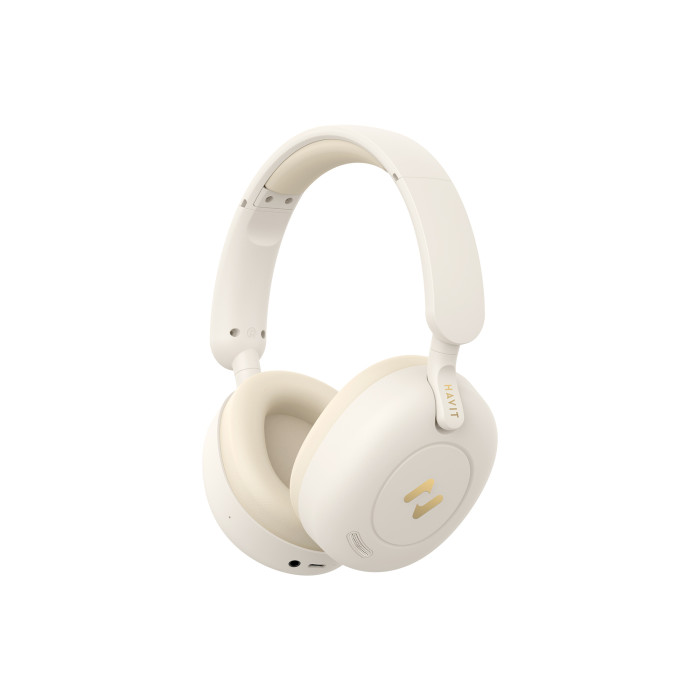




HAVIT HV-H655BT PRO ANC Wireless On-Ear Headphones
Wireless headphones with active noise cancellation. Lightweight and comfortable. Can also be used as wired headphones. Convenient call control and up to 80 hours of music playback. 12-month warranty.
Turning the headphones on and off
To turn the headphones on, press and hold the "On/Off" button for 3 seconds, and to turn them off, press and hold the "On/Off" button for 5 seconds.
Making a wireless connection
To establish a wireless connection, turn on the headphones; the LED indicator will flash red and blue alternately, indicating they are ready to connect. To connect wirelessly, turn on Bluetooth, search for available devices, and select "HAVIT H655BT PRO."
Wireless connection to two devices
To connect the headphones to two devices simultaneously, you must connect them one at a time. First, turn on Bluetooth on the first device, search for and pair them, then disconnect the Bluetooth connection to the headphones, but do not delete the headphones from the list of Bluetooth devices! Next, search for and connect the headphones on the second device, pair them, and then connect on the first device by selecting it from the list.
Call management
To answer or end an incoming call, simply press the "On/Off" button once. To reject an incoming call, press and hold the "On/Off" button for 1 second. Double-click the "On/Off" button to turn on the voice assistant.
Playback and volume adjustment
- To play/pause, briefly press the "On/Off" button.
- Long-press the "+" button to skip to the next track. Adjust the volume upward.
- Long press the "-" button to return to the previous track.
- Short press the "-" button to decrease the volume.
Headphone Modes
Work in several modes: Bluetooth, Game Mode, Annoise Cancelling Mode (ANC) , and (AUX).
Bluetooth Mode
The modern updated version of Bluetooth 5.3 makes the connection more stable and the transmission smoother, while the energy efficiency indicators have also improved. Voice assistant and calling functions are supported in wireless mode.
Game Mode
To activate Game Mode, double-press the ANC button to switch from Music Mode to Game Mode. To return to Music Mode, double-press the ANC button. Game Mode provides lower latency and adds more immersive sound effects.
Anti-Noise Mode (ANC)
Shortly press the ANC button to switch between ANC ON and ANC OFF. Hybrid active noise cancellation technology delivers a noise reduction depth of -40dB±5dB, allowing you to enjoy your favorite music in a noisy city without disturbing you. Using ANC Mode, you'll hear human voices more clearly.
Wired Headphone Mode (AUX)
The headphones can be used as wired headphones by connecting the AUX cable to the jack, allowing them to be connected to a device as wired headphones.
Note: In this mode, you cannot use the headphone function, nor can the microphone or ANC function.
Charging the Headphones
Charging is performed using the USB-C cable included with the device and a compatible USB adapter (5V/1A). While charging, the LED indicator glows red. Once charging is complete, the indicator glows blue. Fully charge the device before first use. Charging during normal use takes approximately 2.5 hours.
Battery life:
- Up to 80 hours of continuous use (depending on volume level and with ANC turned off);
- Up to 48 hourswith ANC turned on).
Factory reset
If you need to restore factory settings (for example, if you cannot pair or observe other changes in the device's behavior), press and hold the "On/Off" button for 8 seconds. The indicator will then flash blue and red alternately.
There are no reviews for this product.